
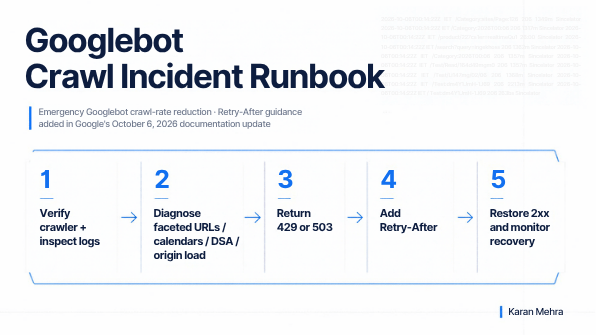
A server incident can become an SEO incident surprisingly fast. When infrastructure starts buckling under crawler traffic, the instinct is often to block Googlebot, throw a blanket firewall rule at the problem, or return whatever error is easiest. Google’s October 6, 2026 crawling-documentation update makes the safer path more explicit: for genuine emergency crawl-rate reduction, sites can temporarily return 500, 503, or 429 responses, and 503 or 429 responses can include a Retry-After header.
The important point is not that Googlebot Retry-After support is new. Google’s own October 6 changelog says the support already existed; the update moves the guidance directly into its crawl-rate reduction documentation so it is easier to find during an incident.
For SEO leaders, platform teams and ecommerce operators, that documentation change is more important than it looks. It turns crawl management into an operational discipline: identify the actual source of pressure, choose the HTTP signal that matches the failure mode, define a recovery window, monitor the hostname and restore normal responses quickly. Done well, you protect infrastructure without unnecessarily damaging discovery, freshness or index coverage. Done badly, a temporary overload can become a multi-day search visibility problem.
Need a crawl-risk review before the next incident? I can help identify crawl waste, server-pressure patterns and technical SEO failure points through my SEO services.
What Google actually changed on October 6, 2026
Google restructured the emergency section of its crawl-rate documentation and added explicit examples of the Retry-After response header. The underlying crawl-control behavior did not suddenly appear on October 6. Google is documenting it more clearly in the place operators are most likely to look when crawler traffic is contributing to an outage.
Google now says that if you urgently need to reduce crawler traffic for a short period—typically a couple of hours, or roughly one to two days—you can return 500, 503 or 429 instead of 200 to crawl requests. When Google’s crawler infrastructure sees a significant number of these responses, it reduces crawling across the hostname and later increases crawling again as the error rate falls.
For 503 and 429, Google says you can also send Retry-After using either a delay in seconds or an absolute UTC date and time. This aligns with the HTTP specifications: RFC 9110 defines Retry-After for temporary unavailability, while RFC 6585 defines 429 Too Many Requests and allows a Retry-After value.
HTTP/1.1 503 Service Unavailable
Retry-After: 120
This does not mean the value is a permanent crawl-speed setting. Think of it as a temporary recovery signal attached to an error response, not a replacement for crawl architecture, URL governance or capacity planning.
429 vs 503 for Googlebot: choose by failure mode
Many technical SEO teams treat 429 and 503 as interchangeable because both can trigger crawl backoff. Operationally, they should still communicate different conditions.
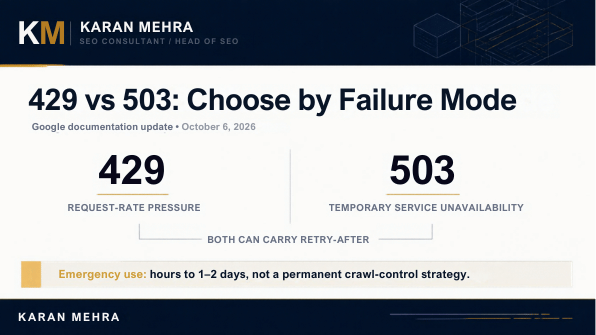
| Condition | Better signal | Why |
|---|---|---|
| A request class is exceeding an explicit rate limit | 429 Too Many Requests | The requester is hitting a rate threshold. |
| The application or origin is broadly unavailable | 503 Service Unavailable | The service cannot temporarily fulfil requests because of overload, maintenance or dependency failure. |
| Unexpected application failure | 500 Internal Server Error | Google can reduce crawling, but the response is less intentional as an incident-control signal. |
A practical rule: use 429 when your system is intentionally rate-limiting that requester or request class; use 503 when the service itself is temporarily unavailable. Google’s crawler guidance groups both into the same emergency family for crawl-rate reduction, but the semantics still matter for logs, CDNs, observability and future incident analysis.
The 1–2 day boundary is an SEO risk threshold, not a target
The most consequential part of Google’s guidance is the time boundary. Google says these emergency responses are appropriate for short periods and warns against leaving them in place longer than one to two days. If Googlebot observes the same error responses on a URL for multiple days, that URL may eventually be dropped from the index.
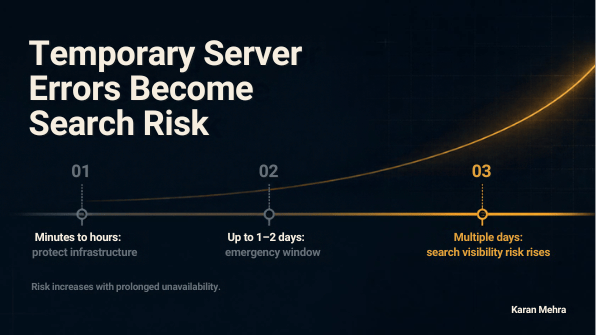
That warning should change how teams design incident response. The goal is not “set a 503 and come back tomorrow.” The goal is to reduce pressure, fix the cause and restore successful responses as soon as the service is healthy. Search recovery begins when the error rate falls; keeping the protection rule active after recovery can extend the damage.
Google’s separate crawling-error troubleshooting guide is even more explicit: return 503 or 429 temporarily when Googlebot is overwhelming a server, stop returning them once crawl pressure falls, and monitor capacity over time.
If your CDN, WAF or bot rules are returning 429/503 without a documented recovery path, that is worth auditing now. You can send me the scenario and I’ll help you frame the SEO risk before it becomes an indexing problem.
Why crawl spikes happen before you throttle Googlebot
Emergency signaling is the treatment, not the diagnosis. Google specifically tells site owners to inspect server access logs and hosting data before deciding that “Googlebot is the problem.” The spike often starts with site architecture or advertising configuration.
1. Faceted navigation and parameter explosions
Filters, sorts and combinations can create an effectively unbounded URL space. Google’s faceted-navigation documentation explains that this can lead to overcrawling and slower discovery of valuable pages. Ecommerce sites are especially exposed because every color, size, category, sort order and filter combination can multiply crawlable URLs.
2. Calendar and date-driven URL spaces
Calendar implementations can expose huge sequences of future or historical date URLs. A crawler sees linked, technically valid URLs; your origin sees a growing volume of pages to generate.
3. Dynamic Search Ads and AdsBot activity
Google also calls out Dynamic Search Ad targets as a possible source of unusual crawling. This matters commercially because emergency crawl reduction can affect more than organic search. Google’s current guidance warns that reducing crawler access can lead to Google Ads campaigns being paused or ads not serving.
4. Bot-management false positives
A CDN or WAF can decide a legitimate crawler looks abusive and rate-limit it automatically. If humans are receiving 200 while verified Googlebot requests are consistently receiving 429, the origin may be healthy while search crawling is being unintentionally suppressed. That is a configuration incident, not capacity management.
Commercially, this distinction matters: “buy more servers” is a poor answer when the real cause is 20 million filter combinations or a bot rule that should never have fired.
A technical SEO incident-response runbook
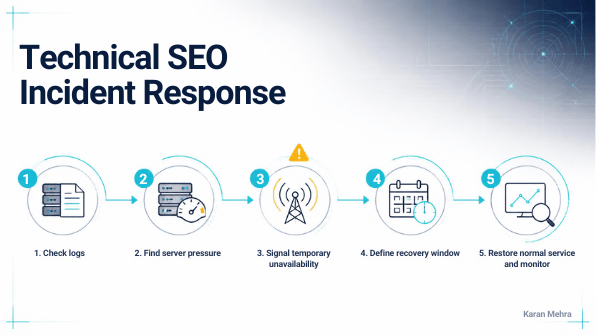
Step 1: verify the crawler and quantify the pressure
Start with access logs, not Search Console impressions. Segment by hostname, user agent, IP verification, path pattern, status code, requests per second, response time and bytes transferred. Determine whether crawler traffic is correlated with actual CPU, memory, database, cache or origin saturation.
Do not assume a user-agent string is genuine. Bot impersonation is common. The operational question is not “do I see Googlebot?” but “what verified request class is consuming which resource?”
Step 2: find the URL pattern causing the demand
Group high-volume requests by template and URL pattern. Look for faceted URLs, query strings, pagination, calendars, internal search, session parameters, infinite combinations, expensive rendering endpoints or accidental links to low-value URL spaces.
If one pattern accounts for most of the crawler cost, long-term remediation should target that pattern rather than permanently throttling the entire hostname.
Step 3: choose the emergency response
If a specific request class has exceeded an intentional limit, 429 is usually the cleanest representation. If the service is temporarily unavailable because the application, database or origin is overloaded, 503 is usually the clearer signal. Keep the rule as narrow as your incident allows.
Step 4: send a realistic Retry-After value
Do not invent a six-hour delay because it “sounds safe.” Use an interval the operations team actually expects to need. If the application should recover in two minutes, a 120-second value is defensible. If the recovery estimate is unknown, your priority is fixing the incident and monitoring errors rather than treating Retry-After as a scheduling system.
HTTP/1.1 429 Too Many Requests
Retry-After: 120
Step 5: restore 2xx responses quickly and monitor recovery
Once the origin is healthy and crawl pressure is under control, remove the emergency rule. Monitor status-code distribution, request rate, Search Console crawl statistics, index coverage and critical money-page freshness. The successful end state is not “Googlebot slowed down.” It is “the site is stable, valuable URLs remain available and wasteful crawl demand has been structurally reduced.”
Want this converted into a site-specific runbook for engineering and SEO? Discuss the implementation with me and bring a sample of your access logs, crawl patterns or CDN rules.
What not to do during a crawl incident
- Do not use 403 or 404 as a rate-limiting shortcut. Google has specifically warned against using ordinary client-error codes for crawl throttling;
429is the intentional exception for rate limiting. - Do not leave emergency errors running for days. Google’s guidance warns that prolonged failures can lead to URLs being dropped from the index.
- Do not treat Retry-After as crawl budget optimization. It is an incident signal, not a permanent SEO control.
- Do not block the entire hostname if one URL pattern is the problem. Diagnose the expensive route and fix the architecture.
- Do not forget paid search. Ads crawlers and Dynamic Search Ad behavior can be part of the traffic pattern, and reduced access can affect campaign serving.
A decision framework for SEO, engineering and growth teams
| Question | If yes | Action |
|---|---|---|
| Is the origin actually overloaded? | Yes | Use temporary incident controls while restoring capacity. |
| Is one requester/request class exceeding a defined threshold? | Yes | Consider 429 + realistic Retry-After. |
| Is the service broadly unavailable? | Yes | Consider 503 + Retry-After. |
| Is crawl waste concentrated in faceted or parameterized URLs? | Yes | Fix URL discovery and crawl architecture after stabilizing the incident. |
| Has the emergency response been active close to 48 hours? | Yes | Escalate immediately; prolonged errors create index risk. |
| Is the origin healthy but Googlebot alone is blocked? | Yes | Audit WAF/CDN/bot-management rules for false positives. |
The business case for treating crawl control as incident engineering
For a large ecommerce or publishing site, crawl behavior is not an abstract technical SEO metric. It touches infrastructure cost, product freshness, paid campaign eligibility, index coverage and the speed at which new inventory or content becomes discoverable.
A mature operating model therefore has three owners, not one: engineering owns service health and HTTP behavior; SEO owns crawl architecture and index risk; growth teams own the commercial surfaces affected by freshness and Ads crawlers. The incident playbook should be shared across all three.
That is the bigger implication of Google’s documentation update. Retry-After is a header. The competitive advantage is having a system that knows when to use it, why the overload happened, how long the protection can safely remain, and what permanent fix prevents the next incident.
Frequently asked questions
Does Googlebot support the Retry-After header?
Yes. Google’s October 6, 2026 crawl-rate documentation explicitly says that when returning 503 or 429, sites can include a Retry-After header using either seconds or an absolute UTC date/time. Google also clarifies that this support is not newly introduced; the documentation location is what changed.
Should I use 429 or 503 for Googlebot?
Use the code that best describes the incident. 429 means the requester has exceeded a rate limit. 503 means the service is temporarily unavailable, commonly because of overload or maintenance. Google can reduce crawling in response to either.
Can 429 errors hurt SEO?
Short-term 429 responses can be an appropriate emergency signal. Persistent 429 responses are different: Google warns that leaving emergency errors active for multiple days can negatively affect visibility and may lead affected URLs to be dropped from the index.
How long can I return 503 to Googlebot?
Google frames the emergency window as a couple of hours or roughly one to two days, not as a guaranteed safe maximum. Restore successful responses as soon as the service is healthy rather than designing around the upper bound.
Can Retry-After replace robots.txt crawl controls?
No. Retry-After communicates a temporary recovery delay on an error response. Long-term crawl efficiency should be handled through URL architecture, internal linking, faceted-navigation controls, capacity planning and appropriate robots directives where they make sense.
Conclusion: protect the server without teaching Google that the site is unavailable
The strongest takeaway from Google’s new documentation is not “add a Retry-After header.” It is that crawler overload should be handled like an incident with a defined start, a technically correct response, a recovery target and a post-incident fix.
Use 429 when rate pressure is the condition. Use 503 when the service is temporarily unavailable. Add Retry-After when it accurately communicates the recovery window. Keep the emergency short. Then fix the faceted URLs, calendar loops, bot rules, expensive templates or capacity constraints that caused the problem in the first place.
If you want a second set of eyes on Googlebot behavior, crawl waste, CDN rules or index risk, review my technical SEO services or contact me with the incident context.
Primary sources: Google: Reduce the Google crawl rate; Google Crawling Documentation Changelog; Google: Troubleshoot crawling errors; Google: Managing faceted navigation URLs; RFC 9110; RFC 6585.


Leave a Reply